
Every creator knows the feeling. You spend hours sometimes days scripting, filming, editing, and perfecting a YouTube video. You upload it with excitement. You hit publish. And then you type something like “Hey guys, watch my new video! Like and subscribe!” in the description box and move on.
That blank description box? It just cost you views, subscribers, and search rankings you will never know you lost.
The YouTube description is one of the most underused, most misunderstood, and most powerful tools available to every creator on the platform completely free, requiring no additional equipment, no budget, and no technical expertise. Just strategy, structure, and a clear understanding of how YouTube actually works.
This blog will give you the complete formula. Not a list of vague tips. A real, actionable, structured formula that you can apply to every video you publish starting today.
Why YouTube Descriptions Matter More Than Most Creators Realise
Before the formula, let’s establish why this matters because if you understand the why, you will never neglect the description box again.
YouTube is the world’s second-largest search engine, processing over 3 billion searches per month. It is also owned by Google, which indexes YouTube video descriptions and uses them to determine what a video is about, how to rank it in both YouTube and Google search results, and which users to recommend it to through suggested videos and the homepage algorithm.
When YouTube’s algorithm reads your video, it cannot watch the footage. It cannot hear your voice. It reads your title, tags, and description to understand your content. A rich, keyword-informed description tells the algorithm exactly what your video covers and gives it confidence to recommend that video to users who are searching for or watching related content.
Beyond the algorithm, descriptions serve your human audience too. They provide context, build trust, deliver value through links and resources, and give viewers a reason to take the next step subscribing, clicking a link, or watching another video.
In short: a great description works for your video around the clock, in ways a great thumbnail simply cannot.
The Anatomy of a Perfect YouTube Description
The perfect YouTube description is not a single paragraph. It is a structured document with distinct zones, each serving a specific purpose. Here is the formula, broken into five clear sections:
Section 1: The Opening Hook (First 2–3 Lines Above the Fold)
This is the most important real estate in your entire description, and most creators waste it completely.
YouTube shows only the first 2–3 lines of your description before the “Show More” button cuts it off both on desktop and mobile. This visible portion appears not just on the video page, but also in Google search results and YouTube search results as the snippet shown beneath your video title.
This means your opening lines are doing double duty: they are speaking to a human reader andbeing read by search algorithms simultaneously.
What to write here:
- A compelling 1–2 sentence description of exactly what the video covers
- Your primary keyword the exact phrase someone would type into YouTube to find this video placed naturally within the first sentence
- A clear value statement: what will the viewer gain, learn, or experience by watching?
What to avoid:
- Starting with your channel name or social media handles
- Generic phrases like “In this video I will…” without substance
- Emojis or filler text that waste keyword-rich space
Example formula:
“[Primary keyword] explained in full in this video, you will discover [specific benefit or outcome] without [common pain point]. Perfect for [target audience] who want [desired result].”
This opening should read naturally, not robotically. Write it as you would write the opening line of an email to someone whose attention you genuinely want to hold.
Section 2: The Expanded Description (Lines 4–10)
Once you have earned the click to “Show More”, the expanded description section gives you room to tell the full story of your video. This section serves primarily an SEO function, but it should still be readable and useful to a human audience.
What to include:
- A 3–5 sentence paragraph expanding on what the video covers, written naturally using your primary keyword and 2–3 secondary or related keywords
- Specific topics, subtopics, or timestamps that appear in the video phrased as the kinds of questions your target viewer might type into search
- Any credentials, context, or authority signals relevant to the topic (“As a certified nutritionist with 10 years of experience…” or “After testing 12 different tools over 6 months…”)
Keyword placement strategy:
YouTube’s algorithm weights keywords that appear early and often in the description, but does not reward keyword stuffing. Aim to use your primary keyword 2–3 times across the full description naturally. Secondary keywords related terms, synonyms, and long-tail variations should appear once each in ways that read as genuine sentences, not a word cloud.
Think of this section as the back cover of a book: it should tell a potential reader (or viewer) enough to confirm that this is exactly what they are looking for, and make them want to experience the full thing.
Section 3: Timestamps & Chapter Markers
If your video is longer than 5 minutes, timestamps are no longer optional. They are essential.
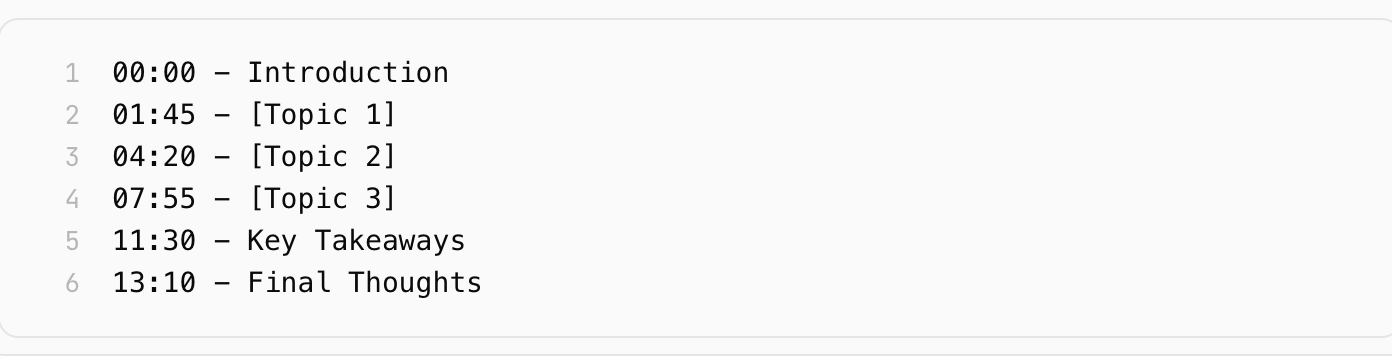
YouTube officially supports chapter markers through timestamps in the description, and videos with chapters receive preferential treatment in certain search features, including Google’s video rich results that display individual chapters in search snippets. This means a well-timestamped video can appear in Google search results with multiple clickable entry points dramatically increasing the surface area of your video’s visibility.
How to format timestamps:
Best practices:
- Begin the first timestamp at 00:00
- Use keyword-rich chapter titles where natural these titles are indexed by YouTube
- Keep chapter labels concise but descriptive (3–6 words)
- For videos under 5 minutes, timestamps are less critical but still useful for viewer navigation
This section costs you five minutes to write and pays dividends in search visibility for the entire lifetime of the video.
Section 4: Links, Resources & Calls to Action
This is where your description transitions from an SEO document into a conversion engine. Everything you want a viewer to do after watching your video lives here and the order in which you present these links matters.
Structure your links in priority order:
- Primary CTA -The single most important action you want viewers to take. For most creators, this is a subscribe link or a link to a lead magnet, course, or product directly related to the video topic.
- Related videos or playlists- Link to 2–3 of your own videos that are topically related. This reduces drop-off, increases watch time, and keeps viewers inside your channel ecosystem.
- Free resources – Any templates, checklists, downloads, or tools mentioned in the video. These build trust and reward viewers who read the description.
- Social media links – Instagram, TikTok, Twitter/X, LinkedIn wherever your audience can find and follow you beyond YouTube.
- Affiliate links or sponsored links – If applicable, always disclose these clearly and honestly. Place them after your own content links to avoid appearing overly commercial.
Formatting tip: Label every link clearly. “Watch next:
→ [link]” performs significantly better than a raw URL dropped without context.
Section 5: Hashtags (The Final Three Lines)
YouTube officially supports hashtags in descriptions, and videos with hashtags display them as clickable links above the video title in the mobile app and on desktop giving your video additional discoverability pathways.
The rules:
- Use 3 to 5 hashtags per video quality over quantity
- Place hashtags at the very end of the description
- Use a mix of: one broad hashtag (#YouTube, #ContentCreator), one niche hashtag (#YouTubeSEO, #FoodBlogger), and one branded hashtag specific to your channel
- Never use more than 15 hashtags – YouTube has confirmed that videos with excessive hashtags may be penalised in search
Example:

Hashtags are the final touch, not the foundation. Do not let them crowd out the more important sections above.
The Complete Description Template
Here is how all five sections come together in a single, copy-ready template:
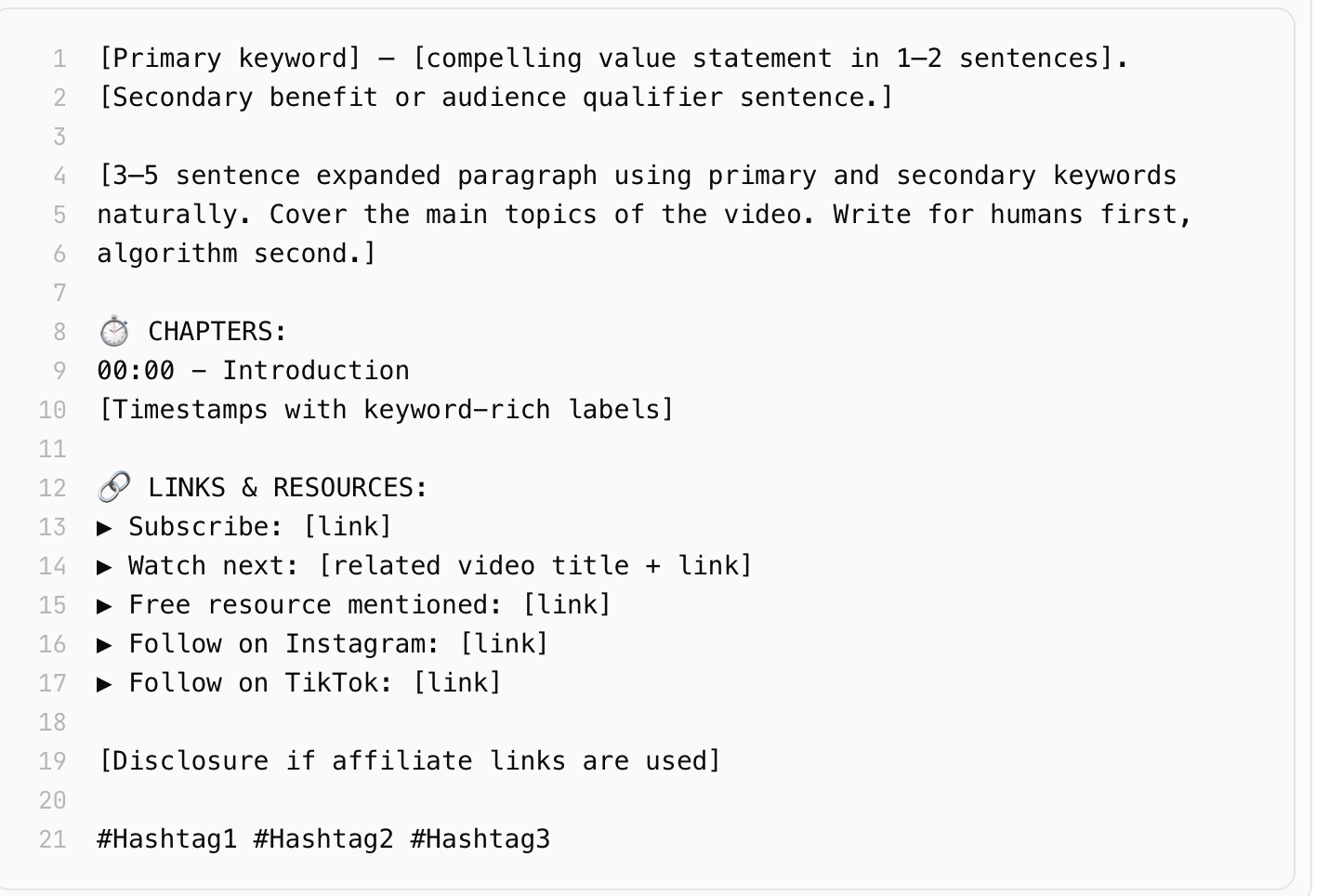
This template is not a rigid script- it is a structural framework. Adapt the language, tone, and content to match your channel’s voice and your audience’s expectations.
Common Description Mistakes That Are Killing Your Growth
Even creators who write descriptions make avoidable errors that undermine the work. Watch for these:
- Copying the same description across multiple videos – YouTube’s algorithm detects duplicate content and may suppress affected videos in search
- Ignoring mobile viewers – Over 70% of YouTube watch time happens on mobile. Write your opening lines knowing they will be read on a small screen
- Burying the primary CTA – If your subscribe link or key resource is the 8th link in the description, most viewers will never see it
- Never updating old descriptions – Descriptions on your older high-traffic videos can be updated at any time. Refreshing the keywords, links, and CTAs on your top-performing videos is one of the highest-leverage SEO actions available to any creator
- Writing for the algorithm only – A description that reads like a keyword list and nothing else signals low quality to both YouTube and your viewers. Balance is everything
The One Mindset Shift That Changes Everything
Most creators think of the description box as an afterthought something to fill before hitting publish. The creators who grow consistently think of it as a second script: a written version of their video that works independently, travels through search engines, earns clicks at 3 AM when they are asleep, and converts casual viewers into loyal subscribers.
Your video does the work of inspiring, entertaining, or educating. Your description does the work of making sure people find it and stay.