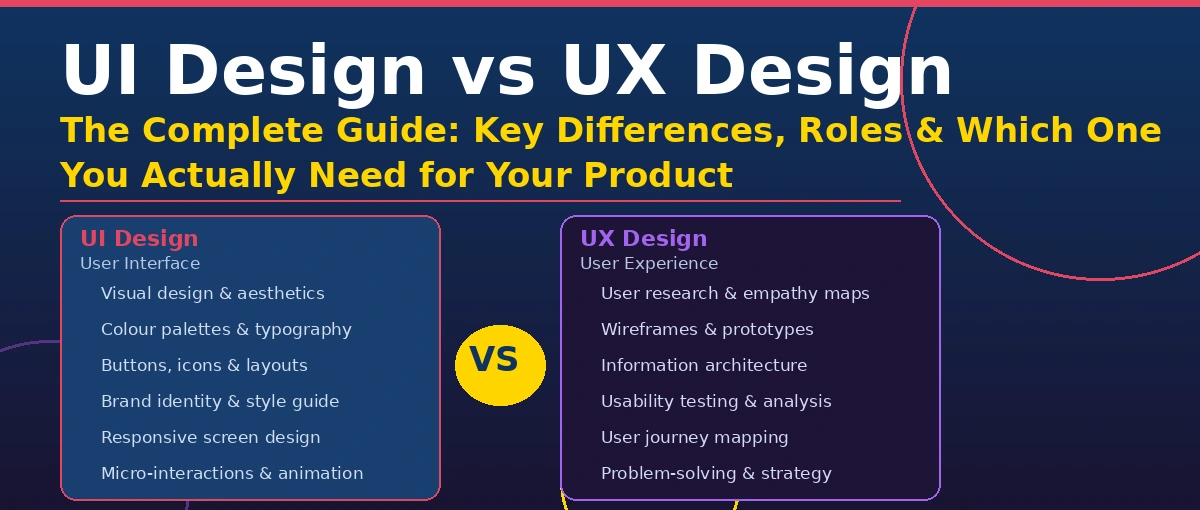
What is the Difference Between UI Design vs UX Design?UI design (User Interface Design) focuses on the visual elements of a product what users see and interact with, including colours, typography, buttons, icons, and layouts. UX design (User Experience Design) focuses on the overall feel and usability how users move through a product, solve problems, and feel during their journey. |
Table of Contents
1. What is UI Design?
2. What is UX Design?
3. UI vs UX Design: Core Differences at a Glance
4. Detailed Comparison: UI vs UX Design
5. Roles & Responsibilities: UI Designer vs UX Designer
6. Tools Used by UI and UX Designers
7. UI vs UX Design: Salary & Career Outlook (2025)
8. Do You Need a UI Designer or a UX Designer?
9. How UI and UX Work Together
10. Common Misconceptions About UI and UX
11. Real-World Examples of UI and UX Done Right
12. Knowledge Graph: Key Entities in UI/UX Design
13. FAQs: UI vs UX Design
14. Conclusion
1. What is UI Design?
UI design, or User Interface Design, is the process of designing the visual and interactive elements of a digital product. It is the discipline responsible for everything a user sees on-screen from the colour of a button to the layout of a dashboard. UI design bridges the gap between a functional product and a visually appealing experience that feels intuitive to navigate.
UI designers are visual communicators. They work with typography, colour theory, iconography, spacing, and brand guidelines to create interfaces that are not only beautiful but also consistent across all screens and devices.
Core Responsibilities of a UI Designer
- Designing visual layouts for web, mobile, and desktop applications
- Creating and maintaining design systems and style guides
- Designing interactive elements: buttons, forms, menus, modals, and tooltips
- Ensuring visual consistency and brand alignment across all screens
- Collaborating with UX designers to translate wireframes into polished designs
- Optimising designs for different screen sizes (responsive & adaptive design)
- Conducting visual QA to ensure pixel-perfect implementation by developers
| Key UI Design Principle: Great UI design is invisible. When done well, users never notice the interface they simply achieve their goals effortlessly without friction. |
Key Skills Required for UI Design
- Visual Design: Mastery of Figma, Adobe XD, or Sketch
- Typography: Font pairing, hierarchy, readability at all sizes
- Colour Theory: Accessible contrast ratios, brand colour systems, emotional colour psychology
- Design Systems: Creating and maintaining reusable component libraries
- Prototyping: Building interactive, clickable prototypes for stakeholder review
- Responsive Design: CSS grids, breakpoints, fluid layouts for all device types
2. What is UX Design?
UX design, or User Experience Design, is the process of enhancing user satisfaction by improving the usability, accessibility, and overall interaction between a user and a product. Coined by Don Norman at Apple in the 1990s, UX design is a human-centred discipline that begins with deep empathy for the user and ends with measurable improvements in how people experience a product.
UX designers are problem-solvers and strategists. They conduct research, build user personas, map customer journeys, and design the architecture and flow of a product before a single pixel is placed. Their goal is to ensure that every interaction a user has with a product is efficient, meaningful, and satisfying.
Core Responsibilities of a UX Designer
- Conducting user research: interviews, surveys, contextual inquiry, and usability tests
- Creating user personas and empathy maps based on research data
- Mapping user journeys and defining key interaction touchpoints
- Designing information architecture (IA) and site/app navigation structures
- Creating low-fidelity wireframes and interactive prototypes
- Running usability testing sessions and analysing heatmaps and session recordings
- Defining and measuring UX success metrics (task completion rate, error rate, NPS)
- Collaborating with product managers, developers, and stakeholders to align on goals
| Key UX Design Principle: UX design starts and ends with the user. Every design decision must be validated against real user behaviour, not assumptions or personal preferences. |
3. UI Design vs UX Design: Core Differences at a Glance
The table below is designed to function as a featured snippet for the query ‘difference between UI and UX design’. It captures the most commonly searched distinctions in a scannable, entity-rich format.
| Factor | UI Design (User Interface) | UX Design (User Experience) |
| Full Form | User Interface Design | User Experience Design |
| Primary Focus | Visual appearance & interactivity | Usability, flow & user satisfaction |
| Core Question | How does it look? | How does it work? |
| Deliverables | Mockups, style guides, design systems | Wireframes, user journeys, research reports |
| Main Tools | Figma, Adobe XD, Sketch, Framer | Figma, Miro, Maze, Hotjar, Optimal Workshop |
| Involves | Colour, typography, spacing, icons | User research, testing, personas, IA |
| Success Metric | Visual consistency & brand adherence | Task success rate & satisfaction score |
| Analogy | The body how a product looks | The mind how a product thinks and flows |
| Rooted In | Graphic & visual design | Psychology, research & product strategy |
| Output Phase | After UX wireframes are complete | Before UI visual design begins |
4. Detailed Comparison: UI Design vs UX Design
4.1 Process & Workflow
In most product teams, UX design precedes UI design in the workflow. The UX designer begins by defining the problem space, conducting user research, and building low-fidelity wireframes to establish the product’s structure. Once the UX architecture is validated, the UI designer steps in to apply the visual layer bringing colours, typography, spacing, and branding to the wireframes.
This sequential but iterative relationship means that UI and UX are deeply interdependent. A product with brilliant UX but poor UI will frustrate users with a confusing visual hierarchy. Conversely, a visually stunning UI built on a broken UX foundation leads to beautiful confusion users love the aesthetics but cannot complete their goals.
4.2 User-Centricity
Both disciplines are fundamentally user-centred, but they focus on different layers of the user’s experience. UX design is concerned with the cognitive and emotional journey reducing friction, cognitive load, and error states. UI design is concerned with perceptual and aesthetic quality ensuring clarity through visual hierarchy, colour contrast, and interaction feedback (e.g., button hover states, loading animations).
4.3 Tangible Outputs Compared
| UX Design Outputs | UI Design Outputs |
| User research reports & findings | High-fidelity visual mockups (Figma) |
| User personas & empathy maps | Component libraries & design systems |
| Customer journey maps | Colour palettes & typography scales |
| Low-fidelity wireframes (Lo-Fi) | Icon sets and illustration guidelines |
| Interactive prototypes for testing | Responsive layout grids |
| Usability test reports | Animation & micro-interaction specs |
| Information architecture diagrams | Annotated design hand-off files for devs |
| Accessibility audit reports | Brand & visual identity guidelines |
5. Roles & Responsibilities: UI Designer vs UX Designer
Understanding the distinct responsibilities of each role is critical when hiring design talent or structuring a design team. Many companies confuse the two, often listing ‘UI/UX Designer’ as a single role which, while common in startups, blurs the specialisation needed for enterprise-grade products.
UI Designer Role Profile
- Reports to: Head of Design or Creative Director
- Works closely with: Front-end developers, brand team, marketing
- Primary tool: Figma, Adobe XD, Zeplin, Framer
- Typical deliverable: A polished, pixel-perfect design file ready for developer handoff
- Measured by: Design consistency, visual quality, pixel accuracy, brand adherence
UX Designer Role Profile
- Reports to: Head of UX, Product Manager, or CPO
- Works closely with: Product managers, data analysts, researchers, developers
- Primary tool: Figma (wireframes), Miro, Maze, Hotjar, Optimal Workshop, Dovetail
- Typical deliverable: Validated wireframes, research synthesis reports, usability test findings
- Measured by: Task completion rate, error rate, Net Promoter Score (NPS), time-on-task
| Hiring Tip for thecoderbox.com clients: For early-stage startups, hiring a generalist ‘UI/UX Designer’ makes economic sense. For scaling products, separating the roles leads to significantly better outcomes in both visual polish and usability benchmarks. |
6. Tools Used by UI and UX Designers
The design tooling ecosystem has evolved rapidly. Figma has emerged as the dominant platform for both UI and UX work, though specialist tools remain essential for research, testing, and prototyping. Below is a comprehensive overview of the tools powering modern design teams.
| Tool | Primary Use | UI or UX? | Free Tier? |
| Figma | UI design, wireframing, prototyping, collaboration | Both UI & UX | Yes |
| Adobe XD | UI design and interactive prototyping | Primarily UI | Limited |
| Sketch | UI design (Mac only), component libraries | UI | No |
| Framer | Advanced interactive UI prototyping & web publishing | UI | Yes |
| Miro | UX workshops, journey mapping, ideation | UX | Yes |
| Maze | Unmoderated usability testing & prototype testing | UX | Yes |
| Hotjar | Heatmaps, session recordings, user feedback | UX | Yes |
| Optimal Workshop | Card sorting, tree testing, IA validation | UX | Limited |
| Dovetail | Research repository and analysis | UX | Yes |
| Zeplin | Developer handoff and design spec documentation | UI | Yes |
| Lottie / LottieFiles | Micro-animation and motion design for UI | UI | Yes |
7. UI Design vs UX Design: Salary & Career Outlook (2025)
Design roles command competitive salaries globally, driven by high demand for digital product expertise. The data below reflects market rates across geographies relevant to thecoderbox.com’s audience.
| Region | UI Designer Salary | UX Designer Salary | Senior UI/UX Designer |
| United States | $75,000 – $110,000 | $85,000 – $130,000 | $130,000 – $180,000+ |
| United Kingdom | £45,000 – £65,000 | £50,000 – £75,000 | £75,000 – £110,000+ |
| India | INR 6L – 18L | INR 8L – 22L | INR 25L – 45L+ |
| Canada | CAD 65K – 95K | CAD 75K – 110K | CAD 110K – 160K+ |
| Australia | AUD 80K – 120K | AUD 90K – 135K | AUD 135K – 180K+ |
| Remote (Global) | $55K – $90K USD | $65K – $105K USD | $100K – $150K+ USD |
Career outlook is strong for both disciplines. According to industry reports, demand for UX designers is projected to grow by over 20% through 2030, while UI roles are evolving toward motion design, design engineering, and AI-assisted design workflows. Skills in Figma, design systems, and design tokens are particularly valued in 2025.
8. Do You Need a UI Designer or a UX Designer?
One of the most common questions clients ask thecoderbox.com: ‘Should I hire a UI designer or a UX designer?’ The answer depends entirely on where your product is in its development lifecycle and what problem you are trying to solve.
| Your Situation | You Need | Why |
| You have a validated idea but no designs | UX Designer first | Define flows, validate assumptions before investing in visuals |
| Your app looks dated but users love it | UI Designer | Visual refresh without breaking proven UX patterns |
| Users are dropping off mid-journey | UX Designer | Identify and fix usability issues through research and testing |
| You have wireframes ready for development | UI Designer | Convert wireframes into polished, dev-ready design files |
| Launching a new product from scratch | Both (UX first, then UI) | Build on validated flows then apply visual polish |
| Rebranding an existing product | UI Designer | Update visual identity consistently across all screens |
| Low user satisfaction scores / high support tickets | UX Designer | Systematic research to find root causes of friction |
| Need a design system or component library | UI Designer | Create consistent reusable components for development teams |
9. How UI and UX Work Together
The most successful digital products are built by teams where UI and UX designers collaborate deeply, not in silos. Think of building a house: the architect (UX designer) determines the floor plan, traffic flow, room dimensions, and structural logic. The interior designer (UI designer) then selects the paint, furniture, lighting, and decor to make the space both functional and beautiful. Neither role alone produces a liveable home.
The Collaborative Design Process
- Discovery Phase: UX leads user research, stakeholder interviews, and competitive analysis
- Define Phase: UX synthesises insights into personas, journey maps, and problem statements
- Ideation & Wireframing: UX creates low-fi wireframes; UI reviews for visual feasibility
- Prototyping: Both collaborate UX on interaction flows, UI on visual fidelity
- Testing: UX leads usability testing; UI refines based on feedback on visual clarity
- Handoff: UI creates annotated, pixel-perfect files; UX documents interaction logic
- Post-launch: UX monitors analytics and feedback; UI iterates on visual improvements
| Industry Insight: Companies like Apple, Airbnb, and Google invest heavily in the intersection of UI and UX often called ‘product design’. Their design systems (Apple HIG, Material Design, Airbnb DLS) demonstrate how deeply UI and UX principles are intertwined. |
10. Common Misconceptions About UI and UX
MYTH: UI and UX are the same thing
FACT: While they work together, they are distinct disciplines with different skill sets, tools, and objectives. Treating them as identical leads to under-resourced, poorly designed products.
MYTH: UX design is just wireframing
FACT: Wireframing is one small output of UX work. The discipline encompasses research, strategy, information architecture, usability testing, and analytics interpretation.
MYTH: If it looks good, the UX is good
FACT: A beautiful interface can be completely unusable. Aesthetics (UI) and usability (UX) are independent variables that must both be optimised.
MYTH: Only large companies need dedicated UX designers
FACT: Startups benefit enormously from early UX investment. Research shows that every $1 invested in UX returns $100 in product development savings (Forrester).
MYTH: UX research is too slow for agile teams
FACT: Lean UX methods guerrilla testing, 5-second tests, and micro-usability sessions can deliver validated insights within a single sprint cycle.
11. Real-World Examples of UI and UX Done Right
Airbnb: UX Excellence
Airbnb revolutionised the travel industry not through superior technology but through obsessive UX design. Their team conducted extensive ethnographic research to understand what made guests feel safe booking a stranger’s home. The result was a trust-driven UX architecture that incorporated verified reviews, host profiles, transparent pricing, and a frictionless booking flow that reduced decision anxiety at every step.
Apple iPhone: UI Excellence
Apple’s iOS UI design has set the global standard for mobile interface aesthetics. The consistent use of SF Pro typography, the refined colour system, the precision of spacing and iconography in the iOS Human Interface Guidelines (HIG) represent UI design principles executed at the highest level. Apple’s UI consistency across all its devices and apps creates a visual coherence that strengthens brand trust and reduces learning curves.
Google Search: Both Done Right
Google’s homepage is perhaps the greatest example of UI and UX working in harmony. The UX insight that users want to search as quickly as possible drove the radical decision to ship an almost-empty page. The UI execution a clean white background, generous whitespace, and a single, prominent search bar perfectly serves that UX intent. Every design decision reinforces the core user goal.
12. Knowledge Graph: Key Entities in UI Design vs UX Design
The following entity table is structured to support Google’s Knowledge Graph extraction and AEO (Answer Engine Optimisation) for featured snippets, People Also Ask panels, and AI-generated overviews.
| Entity | Entity Type | Relationship | Description |
| UI Design | Concept / Discipline | Part of Product Design | The visual and interactive layer of a digital product |
| UX Design | Concept / Discipline | Part of Product Design | The holistic experience a user has with a product |
| Don Norman | Person | Pioneer of UX Design | Coined the term ‘User Experience’ while at Apple in 1993 |
| Figma | Software / Tool | Used for UI & UX Design | Leading collaborative design platform used globally |
| Design System | Artefact | Created by UI Designers | Reusable component library ensuring design consistency |
| Wireframe | Artefact | Created by UX Designers | Low-fidelity blueprint of a screen layout |
| Usability Testing | Method | Core UX Research Method | Testing a product with real users to identify friction |
| Information Architecture | Concept | Defined by UX Designers | Organisation and labelling of content for navigation |
| User Persona | Artefact | UX Research Output | Fictional user profile based on real research data |
| Interaction Design (IxD) | Discipline | Overlaps with UI & UX | Designing how users interact with digital interfaces |
| Human-Computer Interaction | Academic Field | Parent Field of UX | Study of interface design between humans and computers |
| Apple Human Interface Guidelines | Document | UI Design Standard by Apple | Official UI design principles for iOS and macOS apps |
| Material Design | Design System | UI Design System by Google | Google’s open-source design system for Android & web |
| Product Design | Discipline | Encompasses UI & UX Design | End-to-end design discipline merging strategy and craft |
| Conversion Rate Optimisation | Practice | Influenced by UX Design | Improving % of users who complete a desired action |
13. FAQs: UI vs UX Design
Q: Can one person do both UI and UX design?
A: Yes. Many designers especially in startups and small teams work as generalist ‘UI/UX Designers’ who handle both disciplines. However, as products scale, separating the roles leads to better outcomes because each discipline requires deep, distinct expertise.
Q: Which is harder to learn: UI design or UX design?
A: Both have steep but different learning curves. UI design requires mastery of visual design principles, design software, and aesthetic judgment. UX design demands skills in user research methodologies, data analysis, facilitation, and strategic thinking. Most designers lean naturally toward one or the other.
Q: Is UX design a good career in 2025?
A: Yes. UX design is consistently ranked among the top 10 most in-demand tech skills. With the proliferation of AI-driven products, AR/VR interfaces, and voice UI, the demand for skilled UX designers who can design for new interaction paradigms is accelerating.
Q: What is the difference between UX and product design?
A: Product design is a broader role that encompasses UX design, UI design, and product strategy. A product designer typically owns the entire design lifecycle from research to visual delivery, often working closely with product management to define what to build and why.
Q: Do I need to know coding to be a UI/UX designer?
A: Not necessarily, but it helps significantly. UI designers who understand HTML, CSS, and design tokens can collaborate more effectively with developers. UX designers who understand front-end constraints make more realistic, implementable design decisions.
Q: What is the UX design process?
A: The standard UX design process follows the Design Thinking framework: Empathise (user research), Define (problem framing), Ideate (solution exploration), Prototype (build to learn), and Test (validate with users). This is an iterative, non-linear process repeated throughout a product’s lifecycle.
14. Conclusion
UI design and UX design are two sides of the same coin. UX design ensures your product solves the right problem in the right way grounded in research, validated through testing, and optimised for real user behaviour. UI design ensures your product communicates that solution clearly and beautifully through visual hierarchy, brand consistency, and delightful interaction details.
The greatest digital products in the world iPhone, Airbnb, Google, Slack, Figma itself succeed because their teams refused to choose between great UX and great UI. They invested in both, treated each discipline with rigour, and created experiences that are simultaneously intuitive and visually excellent.
Whether you are a startup founder evaluating your first design hire, a product manager briefing a design agency, or a developer trying to understand why your team’s workflows feel disjointed, the answer is almost always the same: invest in both UI and UX design as distinct, valued, and collaborative disciplines.
| Ready to build a product with outstanding UI and UX design? Visit thecoderbox.com to explore our UI/UX design services, case studies, and free resources. Our team of specialist designers and developers can help you go from idea to validated product beautifully. |